To ensure a clean conversion to Quire’s required Markdown and YAML formats, the manuscript Word files should be formatted and marked up as described below prior to transmittal.
This markup is typically best done by the copy editor, though the project editor may find it useful to provide some of these guidelines to the authors beforehand. For instance, for authors to markup desired glossary terms within the text.
For features or formatting not covered here, please consult with the Quire team.
Individual Files & Page Information
Individual chapters or papers within the book should be formatted and provided as individual Word DOCX files. Essentially, everything that’s going to be its own webpage in the online version, should start as it’s own Word doc.
The top of each Word file should include basic information, formatted in a YAML-like way. Meaning it should be identified by item name (title, subtitle, etc.), followed by a colon and then the text.
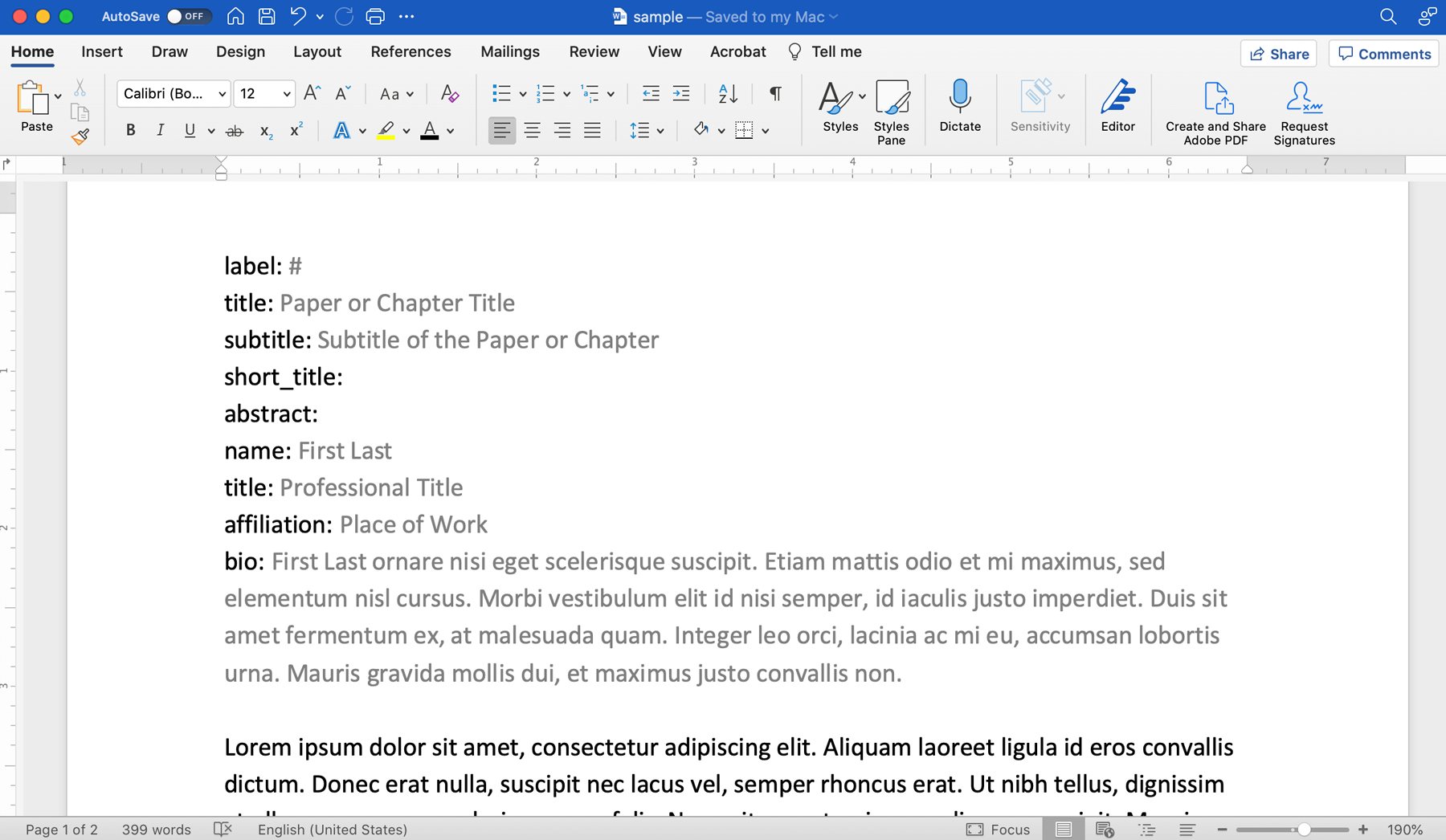
| Key | Description |
|---|---|
| label | chapter or essay number |
| title | title of the page; required |
| subtitle | subtitle of the page |
| short_title | for the navigation bar and running headers; if not included, the “title” will be used instead; 36 characters or less |
| abstract | abstract for the chapter or paper |
| name | contributor’s name as it should be displayed |
| title | contributor’s professional title |
| affiliation | contributor’s professional/institutional affiliation |
| bio | contributor’s bio |
For multiple contributors, the name, title, affiliation, and bio lines can be repeated as necessary.
If desired, contributor information can instead be collected in a separate external document and then referenced in the individual Word files by a contributor id.
General Formatting
Always use Word’s built-in styles to format section headings, superscript numbers, block quotes, bullets, and numbered lists.

Heading levels always start as Heading 2 (or B-level heading),
created in Markdown with ##. You will work down
from there: Heading 3 (###), Heading 4
(####), Heading (#####), etc.
Heading 1 (or A-level heading), created in Markdown with
#, usually indicates the main title of an essay,
but in Quire that information is created with the
title field in the page YAML.
Editor notes intended for the design and development team, should be marked as bold text in the manuscript or included in a separate memo. The tendency is often to use colored or highlighted text for this need, but these attributes are lost in Quire’s conversion process.
Footnotes
Add notes using Word’s Insert > Footnotes tool. They can be footnotes or endnotes in the manuscript, but will ultimately display as chapter endnotes in the final book.
To insert a footnote or endnote in Microsoft Word, you can:
- Click or tap where you want to reference the note in the document
- Select Insert Footnote or Insert Endnote on the References tab
- Enter the content for the note
- To return to editing, double-click the reference mark at the beginning of the note in the document
Figures
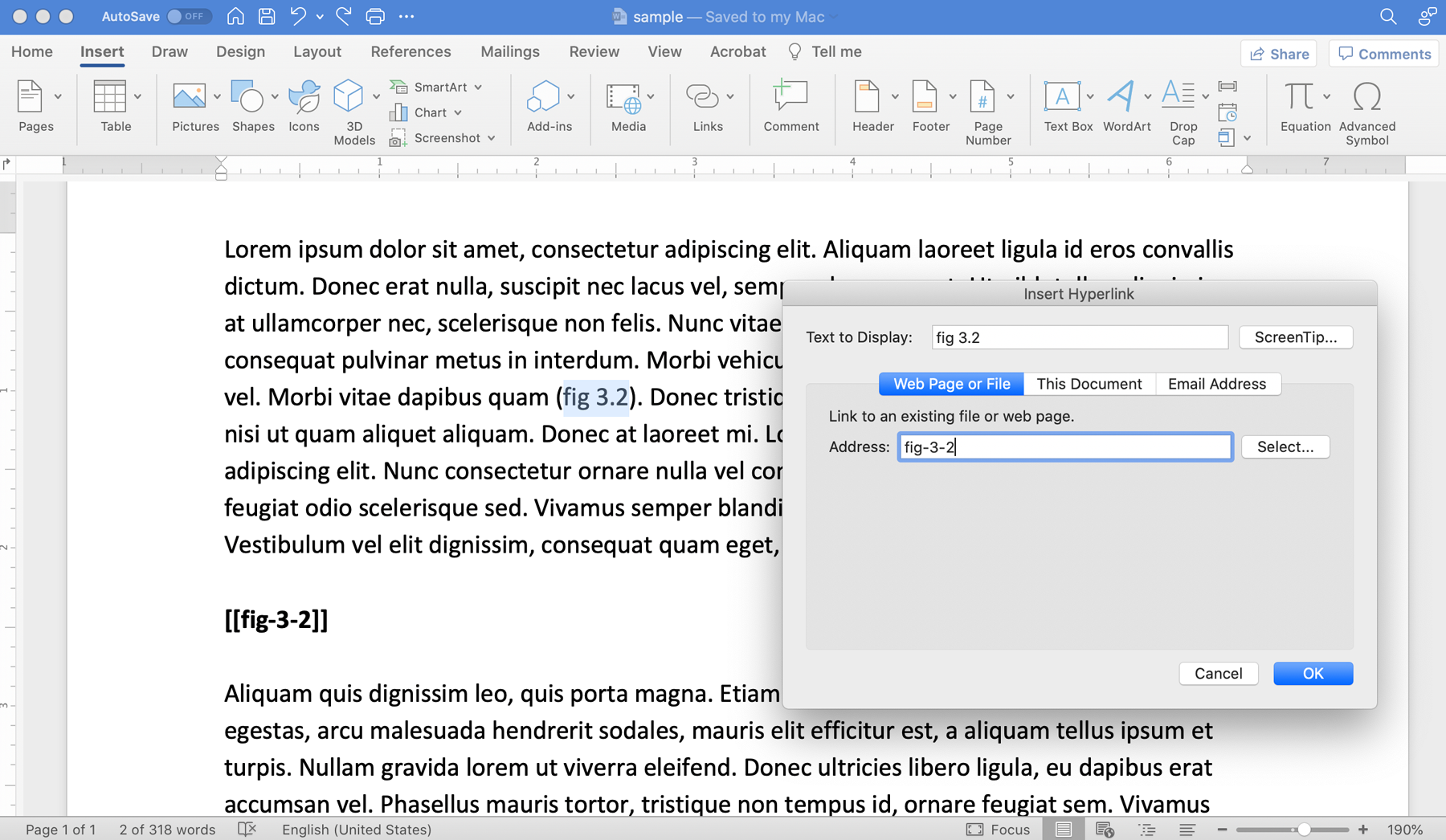
Format figure callouts as hyperlinks with Format > Hyperlink (Cmd‑K). For the link address, use the hyphenated figure number prefixed with “fig-”. So, the callout “Fig. 3.2” would link to “fig-3-2”.
The placement for the figure itself should then be in bold text below that callout’s paragraph, using that same link identifier and surrounded by double brackets. So, figure 3.2 would be inserted as [[fig-3-2]].
Captions and other figure information should be supplied in a separate document, or at the end of the Word file, with figure information formatted in a YAML-like way similar to that previously described for page information.
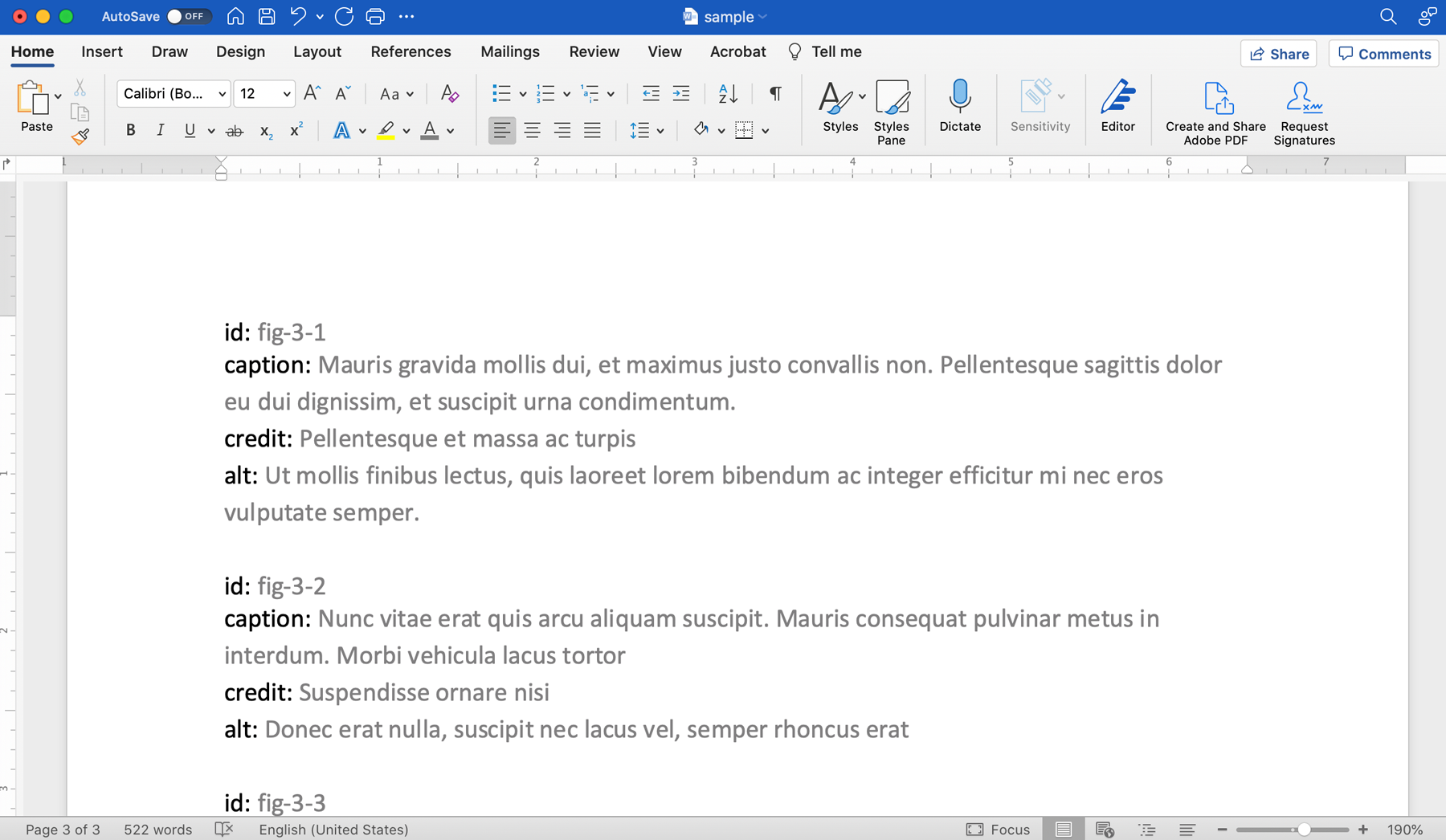
| Key | Description |
|---|---|
| id | identifier that matches that used to link the figure callout and to indicate figure placement in the Word files |
| label | label for figure that matches the callout text |
| caption | figure caption |
| credit | figure credit |
| alt | visual description for web accessibility; typically 30–40 words; not duplicative of the caption |
Alternately, this information may be supplied in a Google Sheet with the column headings matching the keys above (id, caption, credit, atl). To indicate text within the caption or credit as italic, use Markdown-style asterisks. (Note that Excel sheets do not work for this as they don’t, by default, support the Unicode standard to properly capture and display special characters and diacritics.)
Please note that it is not possible to include hyperlinks or shortcodes in figure captions, such as links to other figure images or chapters/sections of the publication, as well as shortcodes for pop-up citations or glossary terms.
Tables
Tables should be included in the transmittal as either individual Word files or Excel files. The digital team will convert the files into HTML. Tables are then treated like figure images and inserted into the Markdown files with shortcodes. As with figures above, please do the following:
- Format the table callouts with Format > Hyperlink (Cmd‑K)
- Identify the placement for the table by including bold text below that callout’s paragraph
- Supply captions and other relevant table information in a separate document, or at the end of the Word file, with table information formatted in a YAML-like way
Please note that it is not possible to add hyperlinks or shortcodes within table content due to the fact that they are created with HTML.
Internal Links
If using internal links to point to other sections in the book, insert them as hyperlinks as noted in the Figures section above. For the link address, use any sensible callout such as the chapter, paper, or catalogue entry number so that the Quire team understands where it should go.
If there will be extensive internal linking, please consult with the Quire team to establish a more specific formatting for the link addresses.
External Links
Getty style indicates that URLs to external resources should appear in full and only within footnotes or references.
Text should not be hyperlinked because, while it might work on the website, the link will be hidden in the PDF/print version.
When including external links, keep in mind that many URLs will break over time which leads to increased maintenance issues and decreased reader usability.
To mitigate these issues follow these guidelines whenever possible:
- Be selective about the links you choose to include
- Link only to stable sources (well established sites and institutions, especially those that offer permanent URLs or DOIs)
- Select the most concise format of the URL available
Author Date Citations
If using in-text pop-up citations, wrap the author name and
date with two dollar signs (i.e. $$Author YYYY$$). This will
help the Quire team add the shortcode
{% cite "Author YYYY" %} required to
create the pop-up.
The text in the brackets must match a corresponding entry in the references file exactly and the resulting pop-up citation will link from that same text. If you wish to customize the text that is linked, or to add a page number references, see the alternate markup in the table below.
| Markup | Description | Sample |
|---|---|---|
| $$Author YYYY$$ | Pop-up citation | {% cite "Author YYYY" %} |
| $$Author YYYY|##$$ | Pop-up citation with page number; the separator can be anything but is global for the whole project, a comma is the default |
{% cite "Author YYYY" "##"
                          %}
|
| $$Author YYYY||YYYY$$ | Pop-up citation but with only the text YYYY displaying as the link |
“… as Author indicated it was ({% cite "Author YYYY" ""
"YYYY" %}).”
|
| $$Author YYYY|##|YYYY$$ | Pop-up citation but with only the text YYYY displaying as the link, and a page number displayed |
“… as Author indicated it was ({% cite "Author YYYY" "##"
"YYYY" %}).”
|
If this shortcode is not correctly applied, this will cause the related entry to be left off the bibliography.
The reference texts should be supplied in a separate document, or at the end of the Word file, with figure information formatted in a YAML-like way similar to that previously described for page information and figures.
| Key | Description |
|---|---|
| id | the short form of the citation, which must exactly match the corresponding citation in the text of the Word document |
| full | the full reference |
Glossary Terms
Glossary pop-ups are a non-standard Quire feature, but have been used on occasion. Please confirm with the Quire team before proceeding.
Glossary terms should be wrapped in ampersands (i.e.
&term&) within the text. This will help the Quire team
add the shortcode
{% def "term" %} required to create the
pop-up.
| Markup | Description | Sample |
|---|---|---|
| &term& | Pop-up definition | {% def "term" %} |
| &term|Terms& | Pop-up definition with an alternate display text |
{% def "term" "Terms" %}
|
The glossary text should be supplied in a separate document, or at the end of the Word file with figure information formatted in a YAML-like way similar to that previously described for page information, citations, and figures.
| Key | Description |
|---|---|
| id | the term, which must exactly match the corresponding citation in the text of the Word document |
| definition | the term’s definition |
Language Codes
Similar to tagging figure callouts, references, and glossary terms you can also tag words with language codes. For example, if your publication features ancient languages and you want to ensure the digital team styles them according to convention and the publication meets accessibility standards please use the following coding pattern:
%%word | language code%%
For example %% Χάρηκα πολύ | gr%% for a Greek
term.
Language codes should come from the IETF BCP 47 standard. Common codes can be found at https://en.wikipedia.org/wiki/IETF_language_tag#List_of_common_primary_language_subtags. If a suitable code is not available, please consult the digital team.
Map Locations
If an interactive map will be included and the project is about the ancient world, authors must provide a Google Sheet or Excel document indicating all locations to be included in the map. The first column of the sheet should be the name of the place as the author would like it to appear, and the second column should be a Pleiades id number. For example, Rome is 423025.
If the places are to be further categorized on the map (by type, or size, or relation to catalogue entries, etc.), this should be captured in subsequent columns. Please consult with the Quire team for details.
For all non-ancient maps, please consult with the Quire team before proceeding.
Catalogue Object Information
For collection catalogues, tombstone object information can be delivered in one of three ways: as a YAML-like block in the Word file for each entry; as a YAML-like block in a single catalogue-wide Word file; or in a Google Sheet.
The specifics of what information and how it is tagged can be customized for each catalogue. But there are a few general rules:
-
Getty collection objects should include a
linkthat is the URL for the object on the getty.edu collection pages. The title information should not be included in the URL, rather just the object number. For example, instead of https://www.getty.edu/art/collection/objects/826/vincent-van-gogh-irises-dutch-1889/, just https://www.getty.edu/art/collection/objects/826/ should be supplied. -
If the catalogue objects are to be sortable by date, hard dates must be supplied as
date_startanddate_end. Adate_displaymay also be included to show in the tombstone. For example:date_display: "ca. 1850"
date_start: 1830
date_end: 1870 -
Typically, larger blocks of object-related texts like Provenance, Exhibition History, and Bibliography are delivered in Word and formatted in Quire as Markdown.